

FAQ
Can I still use my dedicated IP after my membership expires? 
No. A dedicated IP is an add-on to the membership plan. Your account must have an active membership to buy and use it.
While your membership is expired:
• the dedicated IP cannot be used;
• the dedicated IP's own expiry time keeps counting down and is not extended.
After you renew the membership, you can keep using the same IP as long as it has not expired. It is best to keep your membership valid for the whole period of the dedicated IP.
Can I release a dedicated IP early? Will I get a refund?
Yes, you can release it at any time, but there is no refund.
On the Dedicated IP page, click "Release early" under "My dedicated IPs". Once you confirm, it takes effect immediately:
• The IP stops working right away and the remaining time is forfeited.
• The amount already paid is not refunded and is not converted to balance.
• The IP returns to the list of available IPs. Another user may buy it, and getting the same one back later is not guaranteed.
After the release, connecting to that server uses its shared exit. Your membership plan is not affected.
How do I renew a dedicated IP? What happens if I let it expire?
Renewing: on the Dedicated IP page, click "Renew" next to the IP under "My dedicated IPs", or choose the same server in the purchase area and pay again. The IP stays the same and the expiry time is extended from the current one.
If it expires:
• The dedicated IP stops applying. Connecting to that server uses its shared exit instead, and you can still browse normally.
• The expired IP is reclaimed and returned to the list of available IPs, where another user may buy it.
If you want to keep the same IP long term, renew before it expires.
How many dedicated IPs can one account have? Can I switch to a different IP?
One account can hold one dedicated IP per server. You can buy one on each of several servers.
Buying again on a server where you already have a dedicated IP is a renewal: the IP stays the same and the expiry time is extended.
Switching IP: a renewal cannot change the IP. To switch, first release the current one under "My dedicated IPs", then buy again and pick a new IP. Please note that an early release forfeits the remaining time with no refund, and the new IP is paid for separately.
Can I choose which dedicated IP I get? What do "Last purchased" and "Idle for" mean?
Yes. After you choose a server, the page lists every IP currently available on it. You can search and sort the list and click the one you want. If you don't want to choose, keep "Auto assign" and the system gives you the IP that has been idle the longest.
The two columns:
• Last purchased: when this IP was last bought by a user. "Never sold" means no user has had it yet.
• Idle for: how long the IP has been unused since it was last released.
As a rule of thumb, an IP that was never sold or has been idle for a long time is "cleaner" and worth preferring.
If someone else buys the IP just before you confirm, you are asked to choose again and nothing is charged.
How do I buy a dedicated IP? Are there any requirements?
Steps:
1. Sign in on the website and open the Dedicated IP page (also linked from the user menu).
2. Choose a duration.
3. Choose a server. A dedicated IP belongs to one server, and the page shows how many are still available on each.
4. Choose an IP: pick one yourself, or use "Auto assign".
5. Click the pay-with-balance button and confirm.
Requirements:
• Your account must have an active membership. A dedicated IP is an add-on bought separately from the membership plan.
• Payment is taken from your account balance; top up first if it is not enough. The price is the one shown on the purchase page.
After a successful purchase the page shows your dedicated IP and its expiry time. You can also find it under "Purchase history".
What is a dedicated IP? How is it different from a normal line?
A dedicated IP is an exit IP on one specific server that is assigned to your account only. When you browse through that server, websites see this IP, and it is not given to any other user while you hold it.
Compared with a normal line:
• Normal line: users on the same server share its exit IP, so you and other users appear from the same address.
• Dedicated IP: a fixed exit address used only by you. It suits cases that need a stable IP, for example sites or dashboards that recognise devices by IP, or sites that keep asking for verification because many people share one IP.
A dedicated IP only applies when you connect to the server you bought it on. Other servers still use their shared exit.
To buy one, sign in on the website and open the Dedicated IP page.
How do I delete my account?
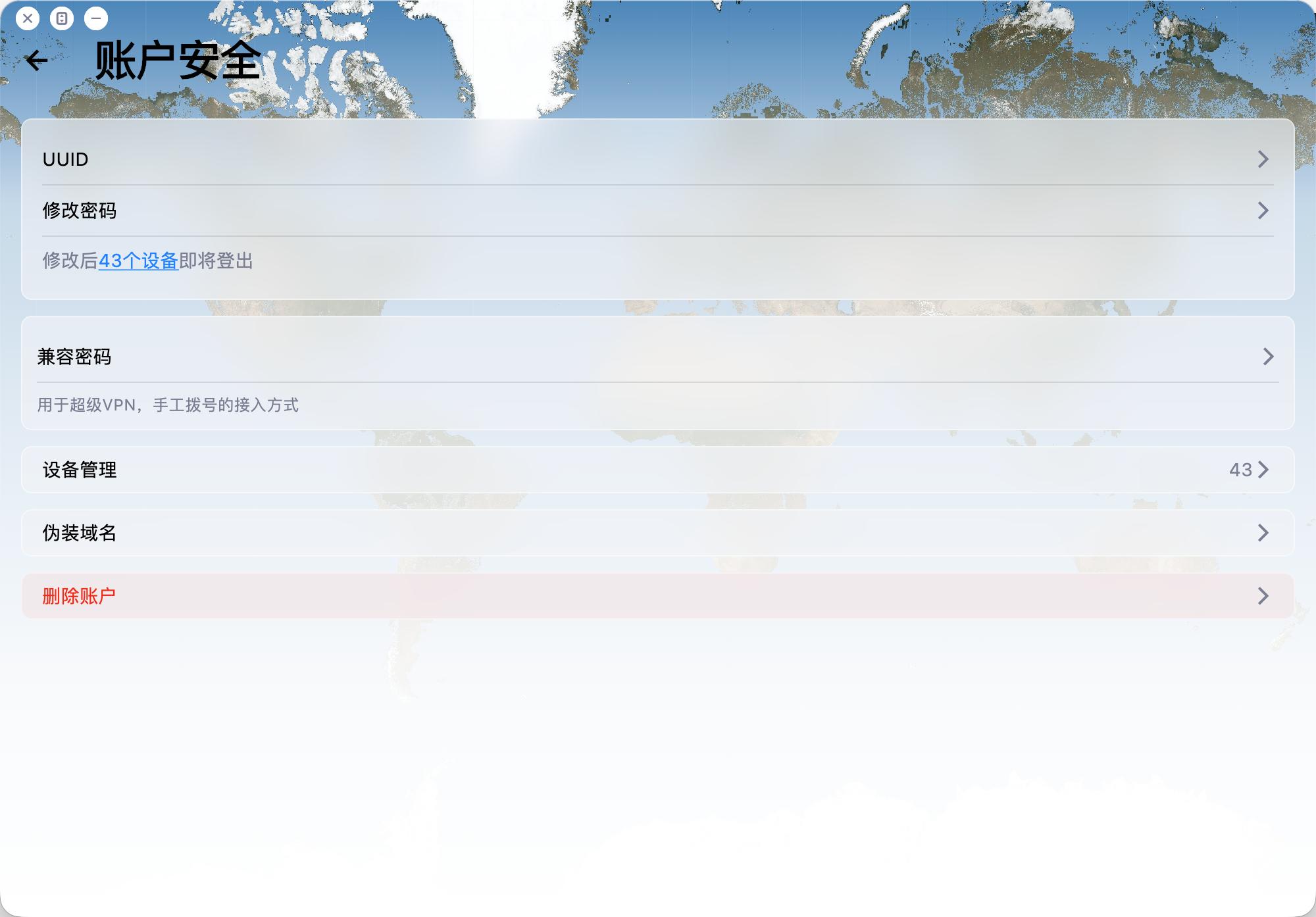
To delete your account:
Open the app and go to Account -> Security -> Delete Account.
Please note:
1. Account deletion is permanent and cannot be undone.
2. Email verification is required before deletion.
3. After deletion, related payment records, usage records, and other associated data will be removed.
4. The account will be deleted regardless of whether you are a VIP member.
Why does my membership show only 7 days after subscribing monthly/yearly through Apple?
If you subscribed through Apple In‑App Purchase, Apple often attaches an introductory period (sometimes shown as a free trial — exact wording and length appear on Apple's checkout screen; seven days is typical).
During that period payment usually hasn't cleared yet, so the remaining time you see in the app (for example about seven days left) usually reflects the trial window, not your full monthly or yearly entitlement already granted.
After the trial: if you have not cancelled before it ends, Apple begins the paid subscription, and your membership duration then advances according to the plan you chose. You may cancel anytime during the trial from Settings → Apple ID → Subscriptions (or the subscription section in the App Store) if you don't want it to renew automatically.
Note: Exact billing timing follows Apple's receipt and subscription terms; wording may vary by region.
How does the referral program and commission work?
Invite friends to 5UF VPN with your referral link or referral code. When they complete eligible purchases, you earn referral balance (commission). This FAQ summarizes the rules; exact percentages, exceptions, and system decisions follow in-site rules, announcements, and backend records.
1. Dedicated domains for high-volume referrers
If you have large referral volume or long-term promotion needs, you may ask human support for a dedicated referral domain (subject to review and technical setup).
2. Commission rate and crediting
For each successful paid order from a user you directly invited, the system credits roughly 10% of the order amount to your referral balance. Actual rate, taxes, currency handling, and whether refunded or disputed orders count are defined in site rules or announcements.
3. Long-term while the L1 relationship applies
As long as the user remains your level-1 invite in our system, their later eligible payments can continue to generate commission (per system records) until the relationship or policy changes.
4. Level 1 only
Only spending from users who registered through your link or code counts toward your commission.
Spending from sub-referrals (level 2 and below) does not count toward your balance, to avoid multi-level payout structures.
5. Attribution window (~7 days)
After someone clicks your referral link, we store attribution for about 7 days (e.g. via cookies). Purchases on the same site domain within that period are matched when possible. If cookies are cleared, or cross-domain/cross-device issues occur, attribution follows actual system logs.
6. Using balance and withdrawals
- Referral balance can be used to buy services on our site (see checkout for scope).
- When withdrawable amount reaches CNY 1,000 or more, you may request a payout via options such as crypto or bank transfer.
- Fees, KYC, and processing details are shown on the application page and support instructions.
For questions about referral linkage, balance, or payouts, open a ticket with your account and order references.
Free tier, daily traffic allowance, and how to keep it active
This FAQ summarizes our public announcement. For the full legal and operational wording, see:
5UF VPN – 15th Anniversary Special Announcement
1. Who may receive the daily free traffic benefit?
Eligible long-time accounts described in that post (for example users registered before the cut-off date stated there, such as 11 Dec 2025—confirm in the article and in your account) can receive a permanent daily free traffic allowance (stated as 128 MB per day in the announcement, subject to system display).
Paid users follow their plan while active; after expiry, if you fall under the free-tier rules in the announcement, you may receive the same daily allowance (verify in the panel).
New sign-ups outside the promotion scope keep the standard free/trial policy then in effect, to protect overall capacity.
2. How to activate or renew it?
- Log in on the official website or the latest official app; eligibility is applied automatically after a short delay—no form is usually required.
- To keep the benefit active, log in on the web or open the app at least once per week, as described in the announcement.
3. Why isn’t the same promotion open to every new user?
The announcement explains that unlimited free access can increase blocking and congestion; the benefit targets loyal users while balancing free and paid capacity.
4. Other notes
- Reset passwords via your registered email.
- Metering, reset times, and account type are shown in the control panel / app and in current announcements.
- Contact support through official tickets if anything looks wrong.
What are human customer support working hours?
Human agents handle tickets, emails, and similar channels during standard Singapore business hours.
- Hours: 9:00 AM – 6:00 PM daily
- Time zone: UTC+8 (same as Singapore, Beijing, Hong Kong, and other GMT+8 regions)
Requests sent outside these hours are handled on the next business day. For urgent connectivity checks, see our FAQ or in-app help first. Thank you for your patience.
Can I get an invoice after subscribing or paying?
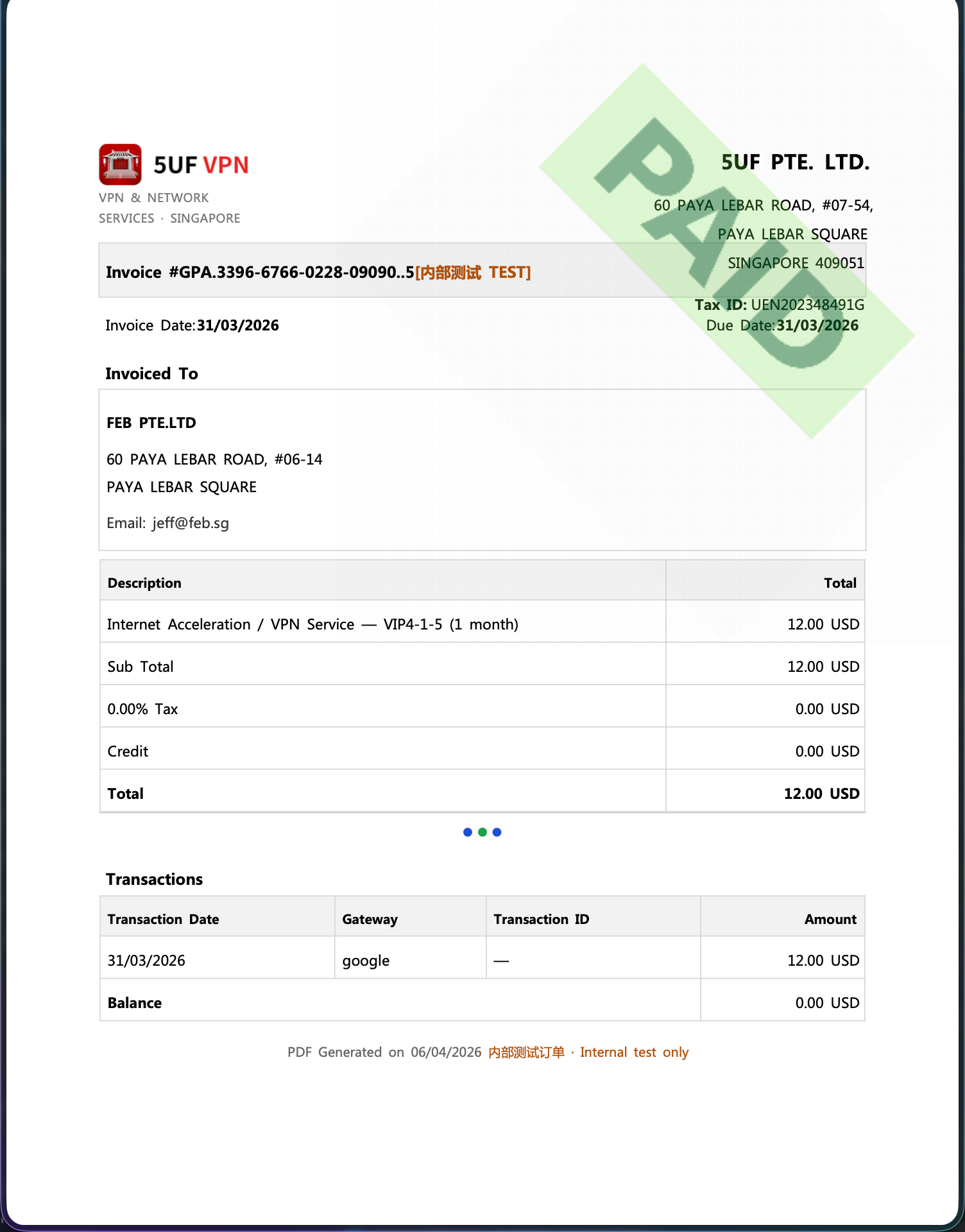
Yes. We provide a formal invoice for every successful payment, suitable for reimbursement and accounting records.
Our company is registered in Singapore and meets its tax obligations there. The invoices we issue follow formats recognised in Singapore (IRAS) for compliant tax documentation.
If you need a Mainland China VAT fapiao or other PRC tax invoice, we cannot provide that at this time.
How to download: sign in and open My Orders, then download the invoice for each payment from its order row.
Invoice fields: On the invoice download page you can enter or edit the bill-to name, company name, address, email, and other fields shown on the PDF. These are separate from your profile fields on the website—you can fill them in any way your accounting requires, update them, and re-download anytime.
Issue date: Each time you generate or download with the current values, the invoice/issue timestamp on the PDF will refresh for that action—refer to the file you just downloaded.
Clearing saved data: If you do not want to keep the entered billing details on the page, use the clear/reset option where available (see the order/invoice download page). Clearing does not change the payment record itself; it only affects whether those details are prefilled next time.
Can I still buy old plans, purchase extra connection slots separately, or get discounts?
We have streamlined our plans and purchase flow under an updated company policy. The goal is a consistent buying and usage experience across platforms and less confusion when choosing options.
Under the current policy, only the “Personal Professional” tier is available for new purchases. It allows up to five devices online at the same time. Extra connection slots or add-on device seats are not sold separately.
What “Personal Professional” maps to: it aligns with the former VIP4-1-5 user group (legacy naming VIP4-X-5, where X is the billing term and 5 means five concurrent connections). The new strategy simplifies checkout so newcomers are not lost in a maze of retired SKUs.
Why “unlimited-style” subscription beats metered anxiety: streaming moved from pay-per-view to subscriptions largely for UX. Heavy daily users usually get better peace of mind on a flat plan; operators may earn less per byte, yet reverting to an iTunes single-track purchase model—deciding before every song—would feel hostile and impractical.
VPN is heading the same way: regular users should not constantly worry about blowing a traffic cap. Use the service on devices you personally own; we do not recommend sharing one account among many people, which may violate acceptable use and hurt security or quality.
For promotions or discounts, follow the checkout page and official announcements; limited-time offers appear on the website or in the app when available.
Why does the “unlimited data” plan still have a limit?
- Without limits, a few users may abuse the service (e.g. servers, heavy sharing), slowing others down.
- VPN servers cost bandwidth, which must be shared efficiently.
- Most “truly unlimited” VPNs silently limit users. We state it clearly.